
eBPF rootkits & forensics: from blinding telemetry to memory detection
Abstract
eBPF are an amazing feature of the Linux kernel but also a dangerous one! Often overlooked, eBPF make it possible to create malicious programs that can hide themselves. At the end of the article, I propose a memory analysis method that exploits the structure of eBPF rootkits to detect them.
In this article we are going to see:
- how eBPF work
- the theoretical architecture of an eBPF malware
- blocking telemetry through the use of an eBPF rootkit
- forensics: finding our rootkit in a memory dump
I wish you a great read!
eBPF
Introducing eBPF
eBPF are a feature that was added to the Linux kernel in 2014 and whose implementation is still evolving today. The revolutionary idea behind this system is to allow changing the kernel’s behavior through an interface other than the one we used historically: driver development. And on top of that eBPF have a gorgeous logo ;)

More concretely, we are going to install hooks in the Linux kernel in order to observe and modify certain behaviors. For this we can use what is called a hook. A hook is simply the modification of a program to divert its flow toward a secondary function.
There are many types of hook in eBPF, notably:
kprobes: kernel probes, lets you hook almost any instruction in the Linux kernel. There is however a blacklist of addresses. For this we use register_kprobe() and unregister_*probes().
Return probes: lets you hook the return of a function by replacing its return address with what the docs call a “trampoline”.
Tracepoint: static instrumentation points in the kernel, inserted ahead of time by the kernel developers. Much less costly in terms of performance.
The cgroup hook: attaches an eBPF to a cgroup (v2): the program then runs for all the processes of that group. This makes it possible to observe or filter behaviors at the granularity of a container or a service rather than for the whole system. For example on network packets (cgroup/skb), socket creation (cgroup/sock), connect/bind addresses (cgroup/sockaddr), sysctl or device access (cgroup/device).
Note: To manage our eBPF, a dedicated syscall was added to the Linux kernel: the eBPF syscall.

eBPF hook ( gotta have a laugh )
Examples of eBPF usage
Many observability projects have built on eBPF technology to strengthen the security of our systems: we can mention Cilium and Falco in particular. Like Sysmon for Linux, they observe what happens in the kernel in order to detect suspicious behaviors.
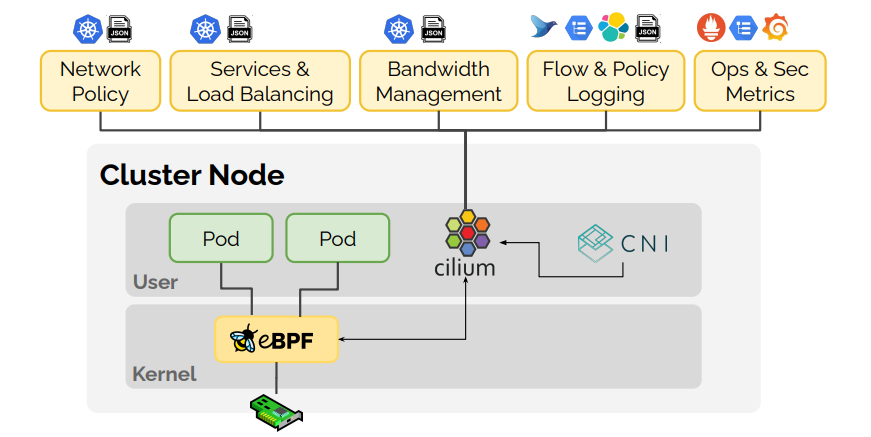
Using eBPF for observability, ref : https://hub.docker.com/r/cilium/docker-plugin
One of the great advantages of this system is that it fits very well into modern containerization architectures, from docker to kubernetes. Indeed, since the kernel is shared between the containers, monitoring the host amounts to monitoring all the guests.
eBPF are also used to modify the kernel’s behaviors. For example Katran, developed by Meta, is a very telling example: it is a high-performance L4 load-balancer based on XDP/eBPF, capable of processing packets very early in the network path. In the same family, LoxiLB offers a cloud-native load-balancer based on Go and eBPF.
XDP eBPF
To keep going with the obscure names, let’s take an introductory detour to talk about XDP eBPF. XDP are a type of eBPF that we will use further down and that specifically let you work on the network layer.
Very powerful, they can even be loaded directly onto the network card. This is ideal for implementing load-balancing or firewall tools.
The problem
Oh yes! It is the return of the big bad guy ( introduced in the previous article: https://nobisd.fr/posts/dfir-graphes-threat-hunting/ ). Obviously, if our eBPF can be used to directly modify the kernel, the bad guys can do it too. It is a flexible and relatively discreet way to persist and hide one’s processes, malicious communications, etc…
This class of malware lodged in the kernel is what we call a rootkit. The threat scenario is that of an attacker who has managed to gain root on the machine and who now wants to hide. Access to the kernel often serves to mask the rest of their malicious activity.
Anatomy of an eBPF rootkit
Here a theoretical presentation of how a minimal eBPF rootkit is structured.
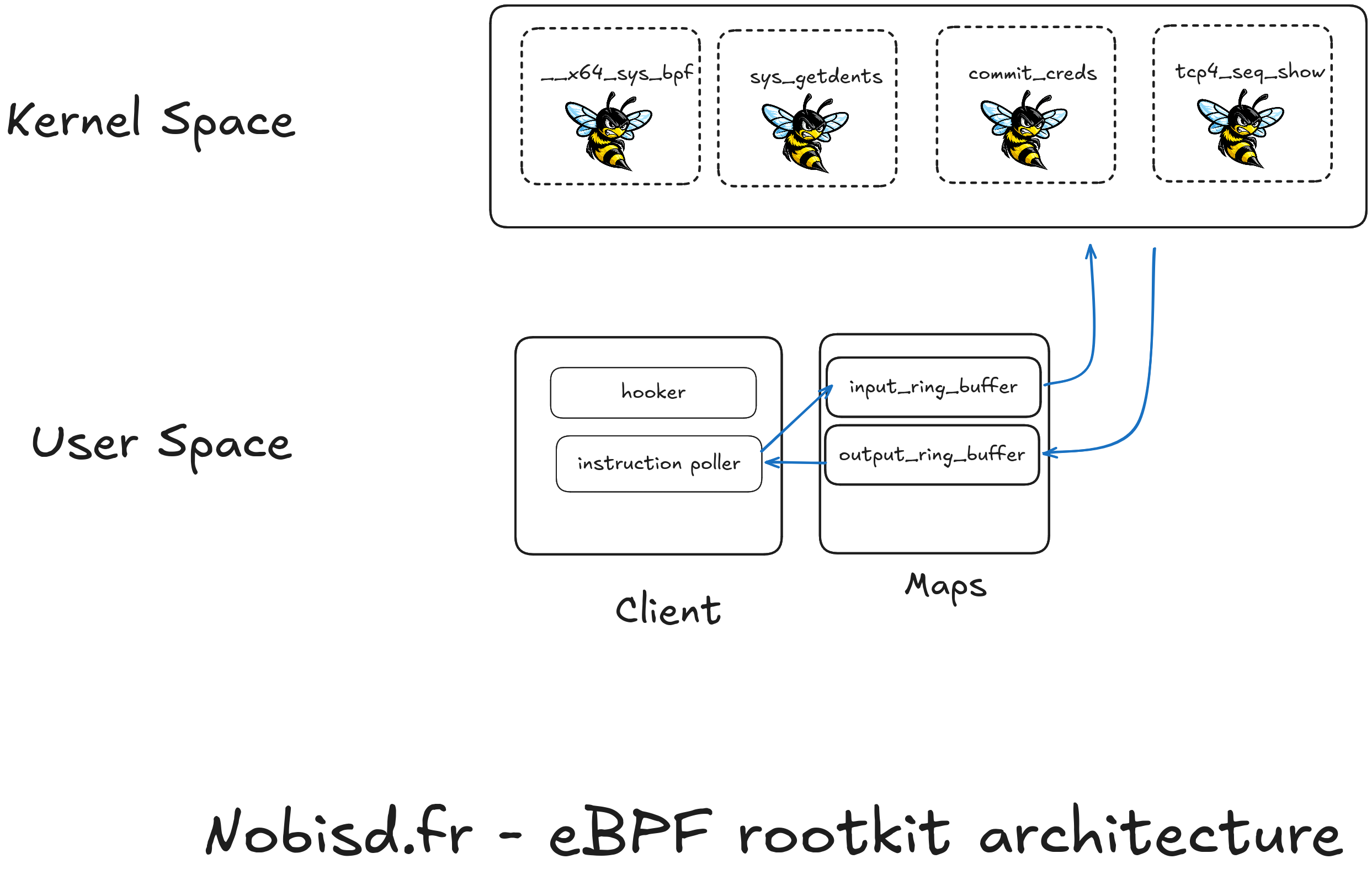
As presented above, our rootkit will have to be structured in two parts: one in user space ( user-space ) and another in kernel space ( kernel-space ).
User space
Client process
Our rootkit will need two important elements: a process that will communicate with the eBPF loaded in the kernel, and the maps which are a space shared with our eBPF programs.
The client program could be driven remotely by an attacker ( through a command and control channel ) or could simply have the goal of loading the eBPF into the kernel and giving them orders. Indeed, to load our malicious eBPF we will have to go through the eBPF syscall so that the kernel checks our eBPF in order to avoid them posing risks of crashing the system. If they pass the tests they will be loaded into the eBPF virtual machine and attached to a kprobe. To be able to load an eBPF a program will already have to be running as root.
The maps
Maps are a shared memory space that allows data to be exchanged between a user space program and eBPF. There are different types of map depending on the data you are trying to exchange but ring buffers generally cover the client-server cases.
We distinguish two ways of using maps: pinned-map or not-pinned. If the map is attached ( pinned :D ), it has a file descriptor open in /sys/fs/bpf/ which can make the rootkit more visible. However, if the map is not attached, as soon as the client eBPF or the program that loaded them is unloaded, the map disappears. If the rootkit developer wants to favor stability, they have every interest in keeping their maps attached.

Pinned map
Kernel space
This is where everything happens, by inserting eBPF at strategic places the rootkit will be able to hide the malicious processes, hide its files and its network connections. By exchanging with the client through the maps, each eBPF takes its instructions to know what to hide, what to modify, etc…
We can mention a few important kprobes ( also present in the diagram above ):
__x64_sys_bpf : this is the function executed by the bpf syscall, here we can modify its behavior to hide the malicious eBPF
sys_getdents : function executed to list the files of a directory (and the processes); diverting it would allow hiding the malicious maps or files, as well as the client process
commit_creds : in charge of managing the permissions of processes, it could be diverted to run all the attacker’s processes as root
tcp4_seq_show : could allow hiding the attacker’s tcp connections
Discovering new kernel symbols
To find new hookable symbols and list the ones of the kernel we can directly read as root the file /proc/kallsyms .
Ex :
theo@theo-rootkit:~$ sudo cat /proc/kallsyms | grep bpf | head
000000000002bac0 A bpf_raw_tp_nest_level
000000000002bae0 A bpf_raw_tp_regs
000000000002bd40 A bpf_misc_sds
000000000002c040 A bpf_pt_regs
000000000002c238 A bpf_event_output_nest_level
000000000002c23c A bpf_trace_nest_level
000000000002c240 A bpf_trace_sds
000000000002c550 A bpf_user_rnd_state
000000000002c560 A __bpf_map_cookie
000000000002c570 A bpf_prog_active
Defending against eBPF rootkits
This is where things get complicated. As revolutionary as this feature is, it raises a certain number of problems.
Comparison with Windows
On Windows, reaching kernel execution is much more complicated: you have to go through a signed driver, most often by exploiting a legitimate but vulnerable driver (the BYOVD technique, Bring Your Own Vulnerable Driver). Not impossible, but really not obvious. On top of that, with protections like HVCI / VBS (code integrity guaranteed by the hypervisor) and DSE (mandatory driver signing), even a loaded driver does not have the same freedom in kernel space. In short, Linux exposes a very powerful kernel extension surface, whose security depends heavily on the configuration: capabilities, lockdown, LSM, unprivileged BPF, Secure Boot, bpftool visibility, etc.
The kernel-lockdown
A protection makes it possible to prevent loading eBPF into the kernel: kernel lockdown. Available in two modes: integrity or confidentiality, this feature is disabled by default. In integrity mode, the kernel prevents loading eBPF that modify the kernel’s behavior and unsigned drivers. In confidentiality mode, the kernel additionally restricts the eBPF capable of reading kernel memory (typically those attached to kprobes through the read helpers), in order to avoid any information leak from the kernel.
In confidentiality, what is left then is tracepoint type eBPF (for observability only) and XDP ( the network part ).
We can check the current mode like this:
cat /sys/kernel/security/lockdown
[none] integrity confidentiality
Above the small [] tell me that I am in none mode, without lockdown.
Note: most major distributions enable kernel lockdown in integrity when secure-boot is enabled in the UEFI. So it is a widespread feature.
The attacker’s workaround: disabling remote telemetry
As we saw earlier, despite kernel lockdown we should be able to load network type eBPF: the XDP, but also the programs attached to a cgroup (cgroup_skb), which are not covered by either of the two lockdown modes. It is this last type that we are going to use here. An attacker could use it for example to prevent the system from sending its logs to the central server, or to introduce a bit of entropy into them.
To test this model we are going to deploy a small range with ludus ( see my article on the subject https://nobisd.fr/posts/ludus-proxmox/ ). We will simply have a victim machine with falco deployed on it that sends its logs to a central elk server.
Let’s start by enabling kernel-lockdown in integrity:
sudo vim /etc/default/grub
# add this line GRUB_CMDLINE_LINUX_DEFAULT="quiet lockdown=integrity"
# Then
sudo update-grub
sudo reboot
We then install falco and enable the service. Falco is a very powerful tool to get visibility on what is happening on a Linux system. We can compare it to auditd, of which it is a more modern version. Falco can run in several modes, including in eBPF to get its view on the kernel.
Here we can see that falco is indeed running in eBPF:
sudo systemctl cat falco | grep engine
ExecStart=/usr/bin/falco -o engine.kind=modern_ebpf
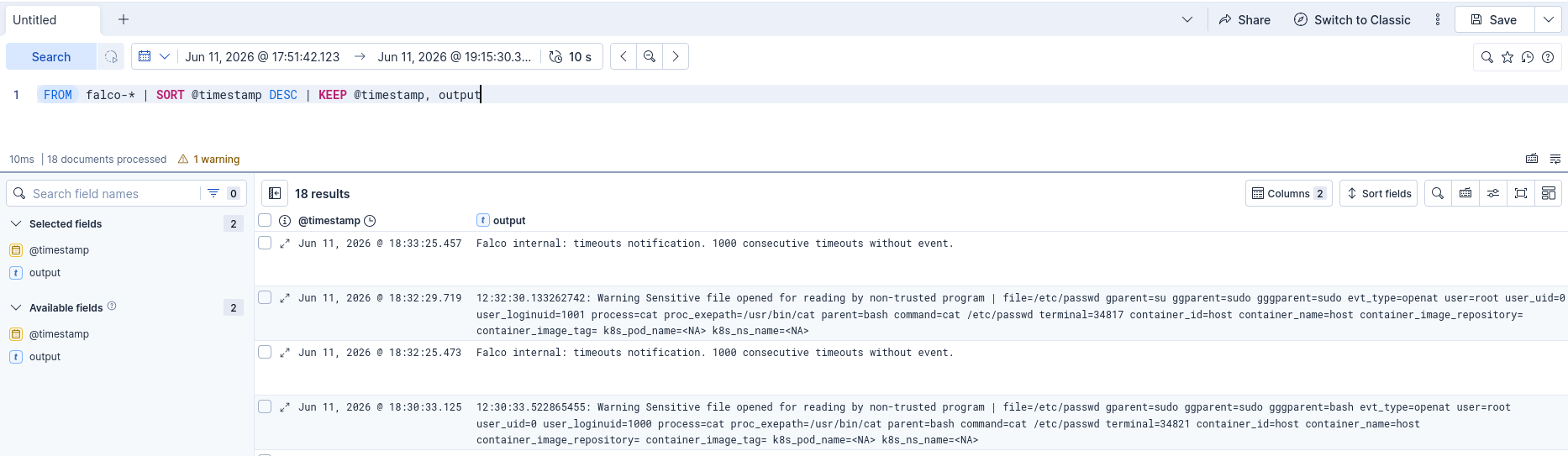
If we perform malicious actions for example cat /etc/passwd we see that we do receive the logs in our SIEM:
Loading a dedicated eBPF rootkit
This time we use a small program written especially for this and available here in the post’s lab: https://github.com/theophane-droid/dfir-ebpf-rootkit/.
Apart from the logic of exchanging data with the map, the bpf program handles blocking the flows here:
static __always_inline int handle_packet(struct __sk_buff *skb, __u8 direction)
{
				...
        if (!rule_matches(rule, dport, direction))
            continue;

        dropped = should_drop_flow(rule,
                                   ip.saddr,
                                   ip.daddr,
                                   sport,
                                   dport,
                                   ip.protocol,
                                   direction);

        emit_event(skb, &ip, sport, dport, idx, direction, rule, dropped);

        return dropped ? 0 : 1;
    }

    return 1;
}
SEC("cgroup_skb/ingress")
int on_ingress(struct __sk_buff *skb)
{
    return handle_packet(skb, DROP_DIR_INGRESS);
}

SEC("cgroup_skb/egress")
int on_egress(struct __sk_buff *skb)
{
    return handle_packet(skb, DROP_DIR_EGRESS);
}
In the loader (client) we will do this to attach the ebpf to the ingress egress of a specific cgroup. Here we use the default cgroup in order to only impact the host’s processes.
 skel->links.on_ingress = bpf_program__attach_cgroup(
        skel->progs.on_ingress,
        cgroup_fd
    );
skel->links.on_ingress = bpf_program__attach_cgroup(
        skel->progs.on_ingress,
        cgroup_fd
  );
We can run it to blind falco:
./loader
listening on cgroup: /sys/fs/cgroup
stats interval: 5s
configured drop rules:
  rule=0 port=50000 direction=out drop=100%
stats:
  rule=0 port=50000 direction=out configured_drop=100% matched=0 dropped=0 passed=0 observed_drop=0.0%
stats:
  rule=0 port=50000 direction=out configured_drop=100% matched=6 dropped=6 passed=0 observed_drop=100.0%
We can see here that falco’s outgoing connections are indeed blocked and our SIEM console no longer receives logs. Blocking the entire flow is deliberately crude here, for demonstration purposes. A mature SIEM could be alarmed by the sudden stop of the logs; we will see below how to refine this. And yet, kernel-lockdown is indeed enabled! We can now delete the falco logs if we want to do log tampering.
rm -rf /var/log/falco/*
What this shows about kernel locking
As we saw in this section, the kernel may well have lockdown enabled. There are still ways to blind the telemetry. Since falco starts a web server that lets you check whether it is still alive, the central server can still think that the machine is working normally.
We could even go further: rather than blocking all the flows, we could filter the body of the messages and block everything that concerns alerts and let the rest of the content through. This is where eBPF can show themselves smarter at doing blinding than a filtering rule that would block the telemetry.
Forensics
Pretty neat! We have been able to see how an attacker could use eBPF to their advantage to blind us. How could we detect such an attack?
For eBPF rootkits we can make the following table about the reliability of the investigation:
| Approach | Reliable if kernel compromised? | Interest |
|---|---|---|
bpftool live | No | Quick triage |
/sys/fs/bpf | No | Easy artifacts |
| Falco/Tetragon | Partial | Detection before blinding |
| AVML from the OS | Medium | Practical if lockdown allows |
| LiME | Medium | Powerful but heavy |
| Hypervisor dump | Yes | Best choice lab/cloud |
| Volatility + exact symbols | Yes if dump reliable | Post-mortem analysis |
So if we suspect a kernel compromise, the ideal is to take a memory dump from the hypervisor.
Taking the dump and generating the symbols
The dump is taken directly from the Proxmox hypervisor, without running anything on the potentially compromised machine (the lab runs on Proxmox, deployed with Ludus, see my dedicated article):
qm monitor <vmid>
qm> dump-guest-memory /var/lib/vz/dump/mem-<vmid>.elf
qm> quit
Volatility needs symbols matching exactly the kernel of the dump. So we first get its version:
strings memory.dump | grep -i "Linux version"
We then download the corresponding Debian dbgsym packages, then we generate the symbols file (ISF) with dwarf2json:
dwarf2json linux \
  --elf ./vmlinux-6.1.0-49-amd64 \
  --system-map ./System.map-6.1.0-49-amd64 \
  > linux-6.1.0-49-amd64.json

mkdir -p symbols/linux
mv linux-6.1.0-49-amd64.json symbols/linux/
All that is left is to point Volatility (and volshell) at this symbols folder, and run the analysis.
Detection strategy
As shown above, an ebpf rootkit is made up of many bricks between the kernel and user space. Rather than going to analyze each of the bricks, to know whether it is malicious, I explore here the strategy of spotting the links between each brick as shown here:
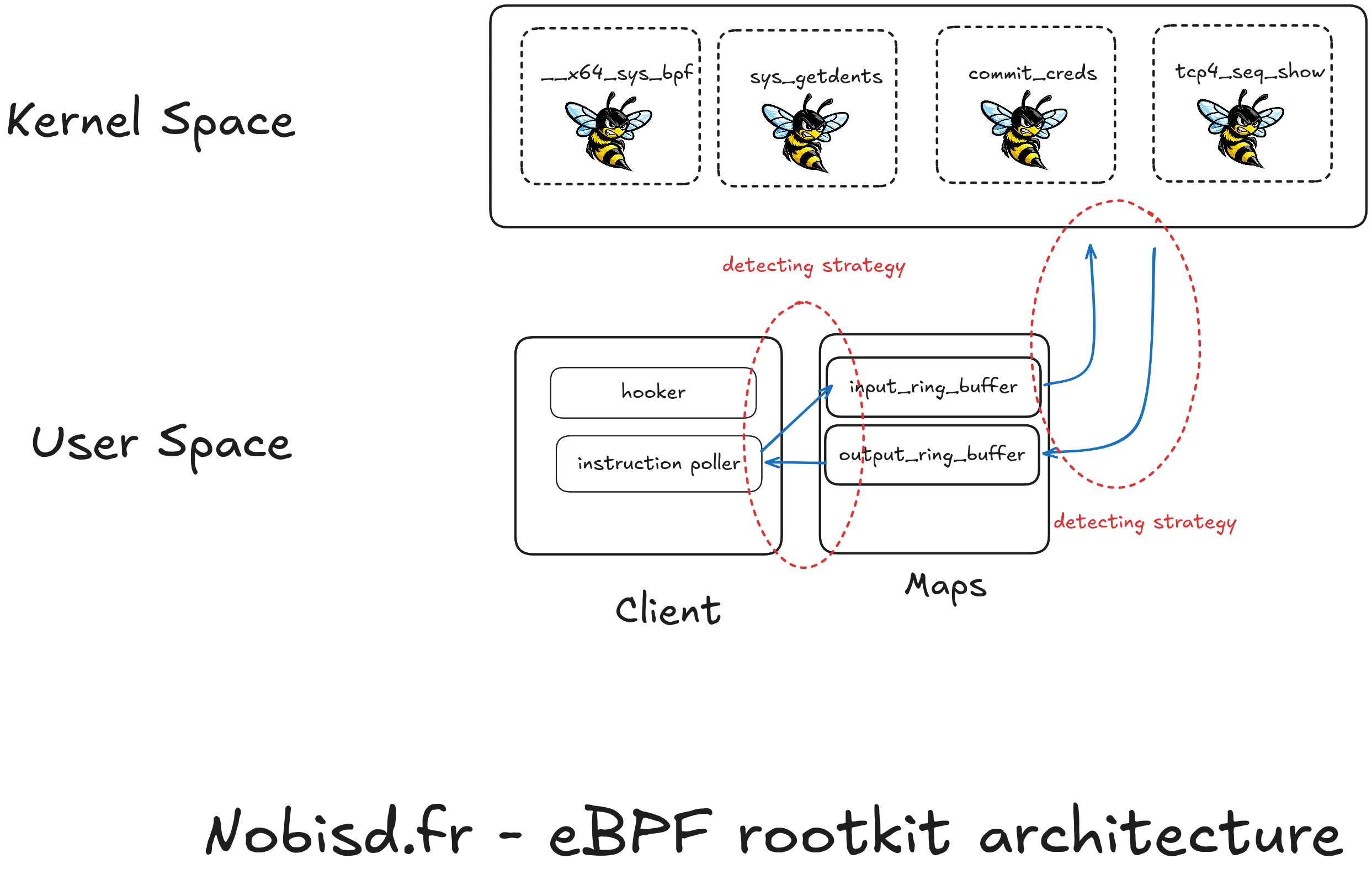
Since the client processes have to keep a map open and the eBPF too, this relationship can be exploited to know which process uses which map and so in the end which eBPF it is talking to.
Detection client - map
Indeed, user processes keep file descriptors open toward the maps they use even if these are not pinned. These file descriptors are visible in memory and can be explored with volatility 3 for example. Using the lsof function provided by the volatility API, we are going to be able to explore all the open files and, based on their type, select those that concern eBPF maps.
Detection eBPF - map
To find the links between our eBPF and the maps, we are going to be able to use the volatility module named linux.ebpf which lists all the eBPF loaded in the kernel. For each program loaded in memory, the kernel maintains a list of the open maps in a table. This table is found by traversing the two successive structures: prog->aux->used_maps .
Linking the two
Once we know the clients and their relations with maps, and the maps and their relation with eBPF, we can now trace the relation between the user programs and the eBPF. This will help us say whether the eBPF is legitimate or not, based on the program that uses it.
Automation
To automate this, I developed a script available on this lab’s repository here: https://github.com/theophane-droid/dfir-ebpf-rootkit/. We can simply use it like this:
volshell  -f mem-dump -s ./symbols/ -l --script find_evil_ebpf.py
Volshell (Volatility 3 Framework) 2.28.0
Readline imported successfully  Stacking attempts finished
Running code from file:///home/theo/memory/analysis_script.py

======================================================================
 Table 1 : file descriptors pointing to eBPF maps
======================================================================
[*] 17 fds pointing to eBPF maps found.

    PID     TID  COMM               FD   MAP_ID  TYPE             NAME             ADDRESS
------------------------------------------------------------------------------------------
    407     407  falco              77       36  PROG_ARRAY       custom_sys_exit  0x88ce0691ba00
    407     407  falco              78       37  PROG_ARRAY       syscall_exit_ta  0x88ce0333e000
    407     407  falco              79       38  PROG_ARRAY       syscall_exit_ex  0x88ce0691b400
    407     407  falco              80       39  ARRAY            interesting_sys  0x88ce0333a000
    407     407  falco              81       40  ARRAY            capture_setting  0x88ce0691bc00
    407     407  falco              82       41  ARRAY            iter_auxiliary_  0xcf02c4245000
    407     407  falco              83       42  ARRAY            iter_counters_m  0x88ce0691b200
    407     407  falco              84       43  ARRAY            auxiliary_maps   0xcf02c4267000
    407     407  falco              85       44  ARRAY            counter_maps     0x88ce0283d800
    407     407  falco              86       45  ARRAY_OF_MAPS    ringbuf_maps     0x88ce0691a000
    407     407  falco              87       46  PROG_ARRAY       extra_sched_pro  0x88ce0691b800
    407     407  falco              88       47  ARRAY            bpf_prob.rodata  0xcf02c42a9ef0
    407     407  falco              89       48  ARRAY            bpf_prob.bss     0xcf02c4359ef0
    407     407  falco              90       49  ARRAY            bpf_prob.data    0xcf02c435cef0
    693     693  loader              4       51  RINGBUF          events           0x88ce0124f800
    693     693  loader              5       52  ARRAY            rule_count       0x88ce0124e600
    693     693  loader              6       53  ARRAY            drop_rules       0x88ce0ae22400

======================================================================
 Table 2 : eBPF programs and the maps they use
======================================================================
[*] 918 program/map associations found.

PROG_ID  PROG_NAME        PROG_TYPE          MAP_ID  MAP_TYPE         MAP_NAME
------------------------------------------------------------------------------------------
      3  sd_devices       CGROUP_DEVICE           -  -
      4  sd_fw_egress     CGROUP_SKB              -  -
      5  sd_fw_ingress    CGROUP_SKB              -  -
      6  sd_fw_egress     CGROUP_SKB              -  -
      7  sd_fw_ingress    CGROUP_SKB              -  -
      8  sd_devices       CGROUP_DEVICE           -  -
      ...
    237  on_ingress       CGROUP_SKB             53  ARRAY            drop_rules
    237  on_ingress       CGROUP_SKB             51  RINGBUF          events
    238  on_egress        CGROUP_SKB             52  ARRAY            rule_count
    238  on_egress        CGROUP_SKB             53  ARRAY            drop_rules
    238  on_egress        CGROUP_SKB             51  RINGBUF          events

 ======================================================================
 Table 3 : user processes linked to eBPF programs via shared maps
======================================================================
[*] 909 process <-> program links via shared maps.

    PID COMM              PROG_ID PROG_NAME        MAP_ID MAP_TYPE         SHARED_MAP_NAME
-----------------------------------------------------------------------------------------------
    407 falco                  36 sys_exit             36 PROG_ARRAY       custom_sys_exit
    407 falco                  36 sys_exit             37 PROG_ARRAY       syscall_exit_ta
    407 falco                 138 open_by_handle_      38 PROG_ARRAY       syscall_exit_ex
    407 falco                 207 vfork_x              38 PROG_ARRAY       syscall_exit_ex
 ...
    693 loader                237 on_ingress           51 RINGBUF          events
    693 loader                238 on_egress            51 RINGBUF          events
    693 loader                237 on_ingress           52 ARRAY            rule_count
    693 loader                238 on_egress            52 ARRAY            rule_count
    693 loader                237 on_ingress           53 ARRAY            drop_rules
    693 loader                238 on_egress            53 ARRAY            drop_rules
Above, we can see that it was possible to:
- table 1: list all the programs that have an eBPF map open and each map used by an eBPF. This way, we were able to identify two user programs that use the eBPF:
falco (pid 407)andloader (pid 693). - table 2: list all the maps held by eBPF programs
- table 3: make the link between the user processes and the eBPF programs through their map
We can then investigate further on the two processes falco and loader, to find out in what context they were launched. This analysis would show that loader is indeed malicious and that all the eBPF that this program uses are therefore malicious.
Limit of this approach
It is entirely possible to imagine eBPF rootkits that would not use maps to communicate with a user program. Such an eBPF could be injected with parameters dynamically chosen according to the needs of the malicious operator.
Conclusion
In this article, we have been able to show that despite the kernel protections that can be put in place, the threat of eBPF rootkits is not extinguished. From this observation, we have been able to show a method to trace the link between user processes and eBPF to make the difference between a legitimate program and a rootkit.
I hope you enjoyed this article, I am exploring this format which aims to be halfway between the view of what an attacker can do and that of a forensic analyst. If you liked it do not hesitate to follow me and to give me feedback on linkedin: https://linkedin.com/in/theophane-dumas.
See you soon on nobisd for more forensic articles!