In part one, we looked at the technical setup needed to approach this kind of analysis. This time, we are going to walk through the investigation itself, with a question that is a bit more serious than it sounds: did an attacker manage to steal the secret of the famous Szechuan sauce?
You can find the PCAP file on the DFIR Madness website. Big thanks to the author for this excellent dataset.
The only thing we know at this stage is that the Szechuan sauce recipe was stored on a share hosted on the Active Directory server.
At first, we know almost nothing about the network we are dealing with. So we are going to move forward step by step, building hypotheses and testing them as we go.
Investigation summary
Let us start by looking at everything we are going to uncover in the investigation below.
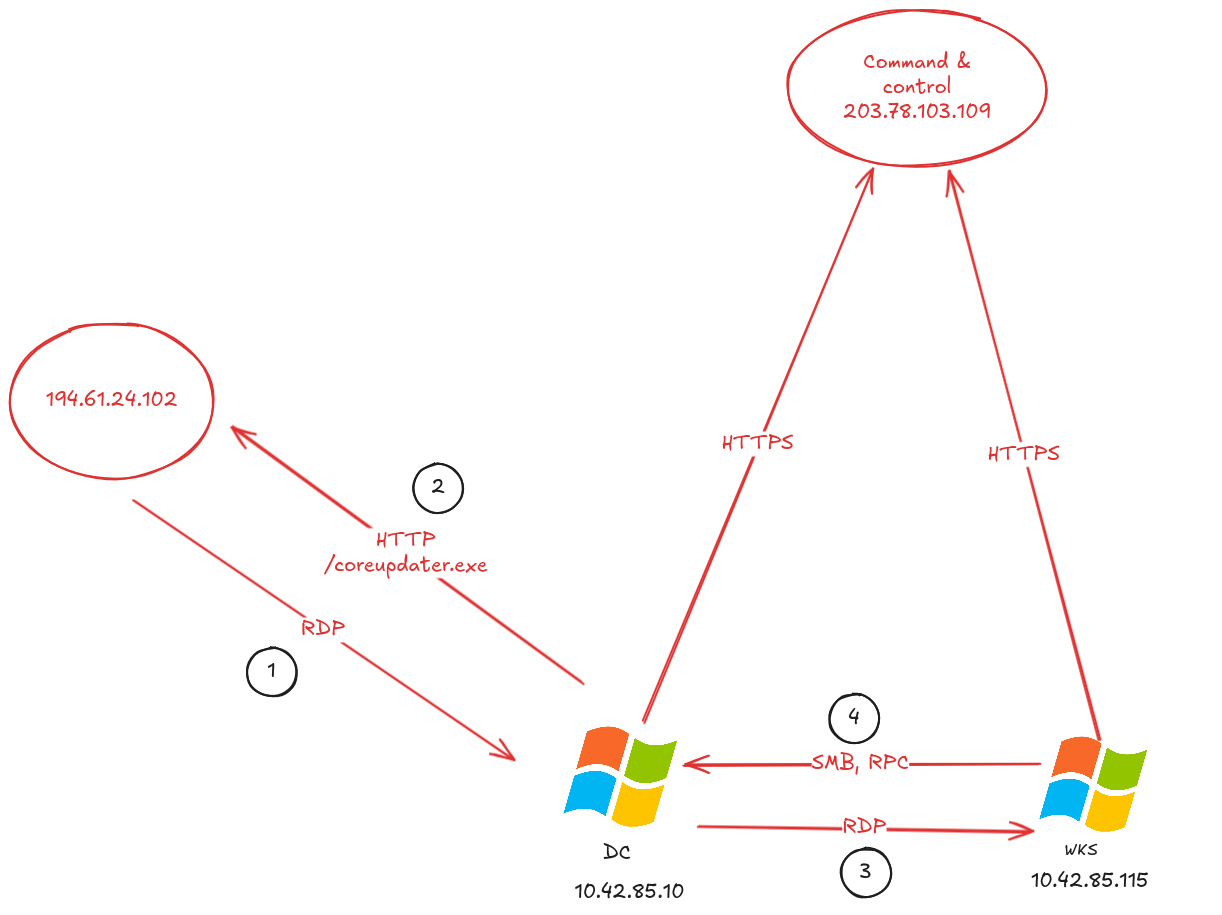
Here is the attack timeline reconstructed from the logs on September 19, 2020:
- 02:19:26 UTC: the public IP
194.61.24.102appears to perform an Nmap scan against our Active Directory server (10.42.85.10) - 02:21:26 UTC: the public IP
194.61.24.102makes a large number of connections to our Active Directory server, likely as part of a brute-force attempt - 02:23:41 UTC: the domain controller downloads a file named
coreupdater.exeover HTTP, which appears to be malicious - 02:35:55 UTC: the suspected attacker pivots to a Windows workstation using RDP
- 02:36:26 UTC: a request related to DPAPI secret extraction is observed between the workstation and the Active Directory server
After that, we do not observe any other clearly malicious activity in the capture.
We can summarize the attacker’s actions like this:
Observed IOCs
IOCs (Indicators of Compromise) are technical artifacts that can be reused in future investigations. An analyst should always keep track of them during an incident.
- suspected attacker IP address:
194.61.24.102 - malware MD5 hash:
eed41b4500e473f97c50c7385ef5e374 - malware command-and-control IP address:
203.78.103.109
The MITRE ATT&CK mapping will be provided in the conclusion, once we have walked through the entire chain.
Analysis
As we saw in the previous article, our data has now been extracted with Zeek and loaded into JupyterLab.
Analyzing the network
We start by building a few statistics around network connections. The first goal is simple: identify who is talking to whom, and especially who is talking way too much.
Let us first check which IPs are the most talkative:
conn["id.orig_h"].value_counts().head(100)
id.orig_h
194.61.24.102                29313
10.42.85.115                  2539
10.42.85.10                    737
fe80::2dcf:e660:be73:d220      116
fe80::a926:8915:319b:2238       18
::                               3
Now let us look at the highest-volume connections by destination IP and port:
conn["total_bytes"] = conn.get("orig_bytes", 0) + conn.get("resp_bytes", 0)
top_flows_bytes = (
    conn[["id.orig_h", "id.resp_h", "id.resp_p", "proto", "service", "total_bytes", "orig_bytes", "resp_bytes", "duration"]]
    .sort_values("total_bytes", ascending=False)
    .head(5)
)
top_flows_bytes
| id.orig_h | id.resp_h | id.resp_p | proto | service | total_bytes | orig_bytes | resp_bytes | duration | |
|---|---|---|---|---|---|---|---|---|---|
| 31709 | 10.42.85.115 | 104.119.185.124 | 443 | tcp | ssl | 37991129.0 | 1858.0 | 37989271.0 | 109.659907 |
| 32078 | 194.61.24.102 | 10.42.85.10 | 3389 | tcp | ssl | 12853439.0 | 2366216.0 | 10487223.0 | 1810.715048 |
| 32089 | 10.42.85.10 | 10.42.85.115 | 3389 | udp | rdpeudp | 6448171.0 | 73592.0 | 6374579.0 | 950.971623 |
| 1698 | 10.42.85.115 | 104.18.12.165 | 443 | tcp | ssl | 4664235.0 | 2328.0 | 4661907.0 | 126.184417 |
| 1340 | 10.42.85.115 | 23.47.193.50 | 443 | tcp | ssl | 4596703.0 | 4575.0 | 4592128.0 | 33.567848 |
These numbers already suggest the presence of two main internal IPs:
10.42.85.11510.42.85.10
Next, let us trace the flows between these two IPs to try to identify their respective roles.
# Filter by IP
internal_ips = [
    "10.42.85.115",
    "10.42.85.10"
]

filtered = conn[
    conn["id.orig_h"].isin(internal_ips) &
    conn["id.resp_h"].isin(internal_ips)
][["id.orig_h", "id.resp_h", "id.resp_p"]]

# Aggregate by source IP, destination IP, and destination port
agg = (
    filtered.groupby(["id.orig_h", "id.resp_h", "id.resp_p"])
    .size()
    .reset_index(name="count")
    .sort_values("count", ascending=False)
)
agg.to_html()
| id.orig_h | id.resp_h | id.resp_p | count | |
|---|---|---|---|---|
| 1 | 10.42.85.115 | 10.42.85.10 | 53 | 656 |
| 5 | 10.42.85.115 | 10.42.85.10 | 389 | 128 |
| 2 | 10.42.85.115 | 10.42.85.10 | 88 | 42 |
| 7 | 10.42.85.115 | 10.42.85.10 | 49155 | 40 |
| 4 | 10.42.85.115 | 10.42.85.10 | 135 | 40 |
Based on the data above, it looks like:
10.42.85.115is a workstation10.42.85.10is the domain controller
The reasoning is straightforward: 10.42.85.115 sends requests to 10.42.85.10 on port 88 (Kerberos), which is exactly what you would expect from a workstation authenticating against Active Directory.
Initial access
Now that we have identified the likely role of each machine, we can move on to the first real question: how does the intrusion begin?
Hypothesis 1: a RAT (Remote Access Trojan) was already implanted in the environment. One of the two machines might be infected with malware communicating with an external IP to receive commands.
We will start by looking at the external IPs most frequently contacted by our internal systems:
filtered = conn[
    conn["id.orig_h"].isin(internal_ips) &
    ~conn["id.resp_h"].isin(internal_ips)
]

agg = (
    filtered.groupby(["id.orig_h", "id.resp_h", "id.resp_p"])
    .size()
    .reset_index(name="count")
    .sort_values("count", ascending=False)
)
agg[:10]
| id.orig_h | id.resp_h | id.resp_p | count | |
|---|---|---|---|---|
| 2 | 10.42.85.10 | 192.168.45.1 | 53 | 584 |
| 18 | 10.42.85.115 | 10.90.90.90 | 443 | 354 |
| 152 | 10.42.85.115 | 208.80.153.240 | 443 | 72 |
| 8 | 10.42.85.10 | 224.0.0.252 | 5355 | 67 |
| 146 | 10.42.85.115 | 204.79.197.203 | 443 | 47 |
| 258 | 10.42.85.115 | 72.21.91.29 | 80 | 46 |
| 151 | 10.42.85.115 | 208.80.153.224 | 443 | 45 |
| 213 | 10.42.85.115 | 40.91.125.0 | 443 | 40 |
| 144 | 10.42.85.115 | 204.79.197.200 | 443 | 39 |
| 254 | 10.42.85.115 | 70.37.74.6 | 443 | 38 |
Among the most contacted external IPs, we find:
192.168.45.1: likely the local DNS resolver, since it is contacted over port 5310.90.90.90208.80.153.240
If we check which domain names those IPs resolve to:
10.90.90.90:settings-win.data.microsoft.com208.80.153.240:upload.wikimedia.org
At this stage, nothing here really points to a C2. These connections look more like fairly normal system or user activity.
So let us test another idea: what if the access came from the outside into our network? At this point, hypothesis 1 is not confirmed.
Hypothesis 2: the malicious connection comes from outside the network to our internal IPs. So we need to look for connections from external IPs to private ones:
filtered = conn[
    ~conn["id.orig_h"].isin(internal_ips) &
    conn["id.resp_h"].isin(internal_ips)
]

agg = (
    filtered.groupby(["id.orig_h", "id.resp_h", "id.resp_p"])
    .size()
    .reset_index(name="count")
    .sort_values("count", ascending=False)
)
agg[:10]
| id.orig_h | id.resp_h | id.resp_p | count | |
|---|---|---|---|---|
| 4 | 194.61.24.102 | 10.42.85.10 | 3389 | 29309 |
| 0 | 194.61.24.102 | 10.42.85.10 | 0 | 1 |
| 1 | 194.61.24.102 | 10.42.85.10 | 14 | 1 |
| 2 | 194.61.24.102 | 10.42.85.10 | 80 | 1 |
| 3 | 194.61.24.102 | 10.42.85.10 | 443 | 1 |
Now this is much more interesting.
The external IP 194.61.24.102 is connecting massively to 10.42.85.10, which we already suspect is the domain controller, on port 3389 (RDP). Seeing RDP exposed from the Internet to a domain controller is already bad enough. Seeing this much of it is a full-blown warning siren.
Let us zoom in using the RDP logs:
rdp = datasets["rdp"]
rdp["dt_utc"] = pd.to_datetime(rdp["ts"], unit="s", utc=True)
filtered = rdp[rdp["id.orig_h"] == "194.61.24.102"]
filtered[["dt_utc", "id.orig_h", "id.resp_h", "id.resp_p", "cookie"]][:5]
| dt_utc | id.orig_h | id.resp_h | id.resp_p | cookie | |
|---|---|---|---|---|---|
| 0 | 2020-09-19 02:19:26.549144983+00:00 | 194.61.24.102 | 10.42.85.10 | 3389 | nmap |
| 1 | 2020-09-19 02:21:26.112469912+00:00 | 194.61.24.102 | 10.42.85.10 | 3389 | Administrator |
| 2 | 2020-09-19 02:21:26.342463017+00:00 | 194.61.24.102 | 10.42.85.10 | 3389 | Administrator |
| 3 | 2020-09-19 02:21:26.564666033+00:00 | 194.61.24.102 | 10.42.85.10 | 3389 | Administrator |
| 4 | 2020-09-19 02:21:26.786791086+00:00 | 194.61.24.102 | 10.42.85.10 | 3389 | Administrator |
We can see that the first RDP connection from 194.61.24.102 to 10.42.85.10 happens on 2020-09-19 at 02:19:26 UTC.
The cookie field contains nmap, which strongly suggests initial reconnaissance using the tool of the same name. Two minutes later, repeated connection attempts begin using the Administrator account, still from the same IP.
Taken in isolation, a username appearing in a field is not enough to prove a compromise. But the sequence scan -> burst of RDP attempts -> same account targeted is very hard to interpret as anything other than a brute-force attempt.
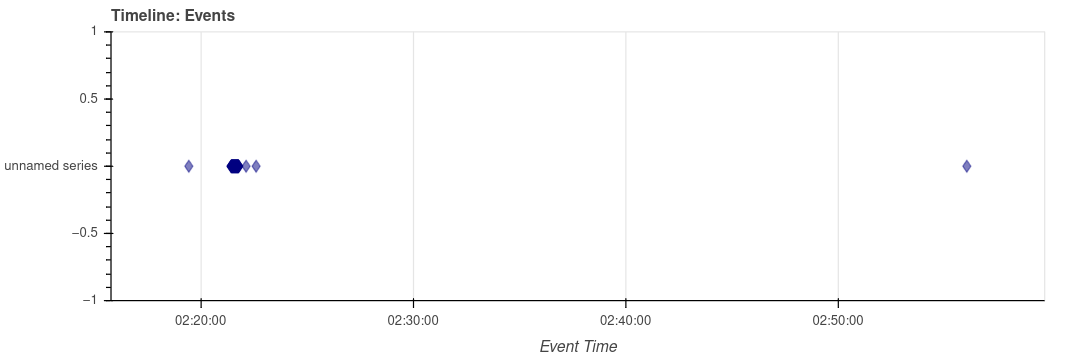
We can even use a visualization to observe these different RDP connections in the dataset:
We can also build a logarithmic histogram:
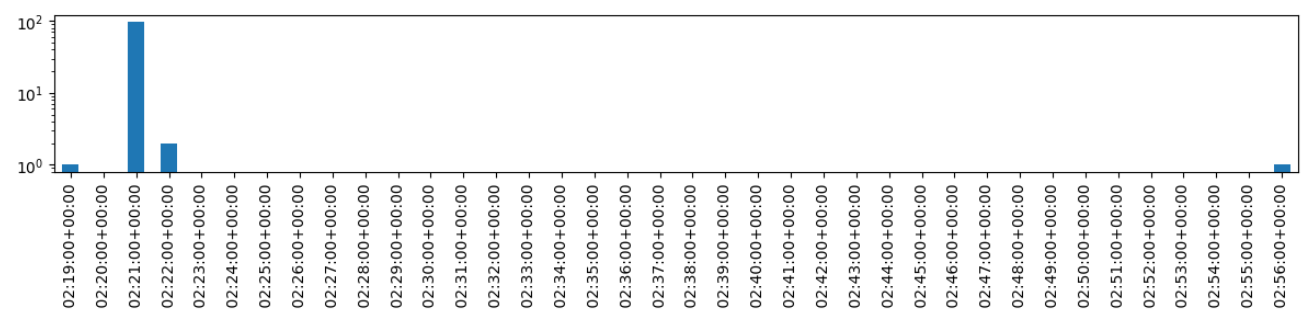
At this stage, the picture holds together quite well: a scan is visible, followed immediately by a burst of RDP connections. The hypothesis of an initial access attempt via RDP is therefore strongly supported.
Domain controller compromise
If our reading is correct, the next question is no longer really “was there an attempt?”, but rather “did it succeed?”
Hypothesis 3: the domain controller was indeed compromised, and then used by the attacker to launch further actions on the network.
Let us look at the requests sent by 10.42.85.10 starting from midnight.
moment = pd.Timestamp("2020-09-19 00:00:00", tz="UTC")
filtered = conn[
    (conn["id.orig_h"] == "10.42.85.10") &
    (conn["dt_utc"] >= moment)
]
agg = (
    filtered.groupby(["id.orig_h", "id.resp_h", "id.resp_p"])
    .size()
    .reset_index(name="count")
    .sort_values("count", ascending=False)
)
agg
| id.orig_h | id.resp_h | id.resp_p | count | |
|---|---|---|---|---|
| 3 | 10.42.85.10 | 192.168.45.1 | 53 | 219 |
| 8 | 10.42.85.10 | 224.0.0.252 | 5355 | 51 |
| 2 | 10.42.85.10 | 10.42.85.255 | 138 | 26 |
| 1 | 10.42.85.10 | 10.42.85.255 | 137 | 26 |
| 4 | 10.42.85.10 | 194.61.24.102 | 80 | 4 |
Something should immediately stand out here: the Active Directory server is contacting the attacker’s machine over port 80.
10.42.85.10 -> 194.61.24.102:80
And since port 80 most likely means HTTP, we can use the Zeek HTTP logs to see what is actually happening.
http = datasets["http"]

filtered = http[
    (http["id.orig_h"] == "10.42.85.10") &
    (http["id.resp_h"] == "194.61.24.102")
]
filtered[["dt_utc", "method", "host", "uri", "uid"]].to_html()
| dt_utc | method | host | uri | uid | |
|---|---|---|---|---|---|
| 119 | 2020-09-19 02:23:41.731918097+00:00 | GET | 194.61.24.102 | / | CJhJ7x4MLfrnnZXrNl |
| 120 | 2020-09-19 02:23:41.797122955+00:00 | GET | 194.61.24.102 | /favicon.ico | CJCXOJ3CW883nvrbL5 |
| 121 | 2020-09-19 02:24:06.939239025+00:00 | GET | 194.61.24.102 | /coreupdater.exe | C9BMVw42pztyZxB25c |
This sequence is very telling. After accessing http://194.61.24[.]102/, the host downloads the file:
http://194.61.24[.]102/coreupdater.exe
The download happens at 02:24:06 UTC on September 19. Based on the User-Agent, the browser might be Mozilla Firefox, although of course that field can be spoofed.
The important point here is not really the browser, but the overall logic: an internal machine, right after a phase of RDP access attempts, retrieves an executable from attacker-controlled infrastructure. At that point, it becomes very hard to argue that this is just benign activity.
Hypothesis 3 is therefore strongly confirmed: the domain controller appears to have been compromised and then used to download a malicious tool.
Hypothesis 4: if this is indeed an attacker, coreupdater.exe is probably a malicious tool, perhaps a loader or a RAT used to maintain access to the environment.
Let us now use the Zeek dataset that tracks files, pivoting on the UID. The UID is a unique identifier that allows us to correlate the same session across all Zeek log files.
files = datasets["files"]
files[files["uid"] == "C9BMVw42pztyZxB25c"][["uid", "extracted", "total_bytes"]].to_html()
| uid | extracted | total_bytes | |
|---|---|---|---|
| 561 | C9BMVw42pztyZxB25c | extract-1600482246.939862-HTTP-F15zmh1fD5AVKS9HX9 | 7168.0 |
Brace yourselves: top-tier reverse engineering ahead
The previous code told us where Zeek extracted the file in question, namely coreupdater.exe. We can now take a look at the binary located at extract_files/extract-1600482246.939862-HTTP-F15zmh1fD5AVKS9HX9.
[nobisd@investmachine network_investigation]$ file extract_files/extract-1600482246.939862-HTTP-F15zmh1fD5AVKS9HX9
extract_files/extract-1600482246.939862-HTTP-F15zmh1fD5AVKS9HX9: PE32+ executable for MS Windows 4.00 (GUI), x86-64, 3 sections
It is indeed a PE file, in other words a Windows executable. And if we use the greatest reverse engineering tool of all time:
[nobisd@investmachine network_investigation]$ strings extract_files/extract-1600482246.939862-HTTP-F15zmh1fD5AVKS9HX9
!This program cannot be run in DOS mode.
Rich}E
.text
`.rdata
@.lhru
PAYLOAD:
ExitProcess
VirtualAlloc
KERNEL32.dll
...
KERNEL32.dll
VirtualAlloc
ExitProcess
We can see that the program references VirtualAlloc, which could very well be used to allocate memory for an in-memory second stage. On its own, that detail is not enough to classify the binary. But put back into context-downloaded from attacker infrastructure, suspicious filename, then followed by later communications-it clearly reinforces the idea that we are dealing with a loader.
We then compute its hash and run a quick search on VirusTotal:
~/project/blog_content/network_investigation> md5sum extract_files/extract-1600482246.939862-HTTP-F15zmh1fD5AVKS9HX9
eed41b4500e473f97c50c7385ef5e374  extract_files/extract-1600482246.939862-HTTP-F15zmh1fD5AVKS9HX9
Searching that MD5 on VirusTotal leads us to this analysis. The file is flagged as malicious by 64 out of 72 engines, and the sandbox behavior shows that the malware connects to 203.78.103.109 over TCP/443.
So we have just recovered an additional IOC, and more importantly, a very good lead for the rest of the investigation.
Hypothesis 5: once installed on the host, the coreupdater.exe malware communicated with its command-and-control server to receive instructions.
Command and Control
Let us now pivot on the IP address found earlier by looking for communications directed to it:
filtered = conn[conn["id.resp_h"] == "203.78.103.109"]
filtered[["dt_utc", "id.orig_h", "id.resp_h", "id.resp_p", "duration", "orig_bytes", "resp_bytes"]]
| dt_utc | id.orig_h | id.resp_h | id.resp_p | duration | orig_bytes | resp_bytes | |
|---|---|---|---|---|---|---|---|
| 31591 | 2020-09-19 02:25:18.565675974+00:00 | 10.42.85.10 | 203.78.103.109 | 443 | 257.869415 | 31790.0 | 896029.0 |
| 32077 | 2020-09-19 02:29:49.290306091+00:00 | 10.42.85.10 | 203.78.103.109 | 443 | 1377.098415 | 25527.0 | 556338.0 |
| 32722 | 2020-09-19 04:08:45.483779907+00:00 | 10.42.85.115 | 203.78.103.109 | 443 | 5396.529843 | 21655.0 | 461378.0 |
| 32724 | 2020-09-19 02:56:38.402867079+00:00 | 10.42.85.10 | 203.78.103.109 | 443 | 9733.238141 | 54286.0 | 908141.0 |
| 32725 | 2020-09-19 02:40:49.936292887+00:00 | 10.42.85.115 | 203.78.103.109 | 443 | 10674.445423 | 228414.0 | 1674989.0 |
We do indeed find several communications to this IP. On top of that, workstation 10.42.85.115 is also talking to the same infrastructure. That suggests the compromise did not stop at the domain controller.
Now let us check whether 203.78.103.109 initiated any communications back into our environment:
filtered = conn[conn["id.orig_h"] == "203.78.103.109"]
filtered[["dt_utc", "id.orig_h", "id.resp_h", "id.resp_p", "duration", "orig_bytes", "resp_bytes"]]
No results.
At this point, hypothesis 5 is strongly supported: the domain controller, and then the workstation, appear to have communicated with the C2 infrastructure identified through the sample.
Lateral movement
Now that we have a compromised domain controller, the next question becomes: how far did the attacker go?
Hypothesis 6: after compromising Active Directory, the attacker used that access to pivot to workstation 10.42.85.115.
Let us look for RDP connections between the two machines:
rdp[
    (rdp["id.orig_h"] == "10.42.85.10") &
    (rdp["id.resp_h"] == "10.42.85.115")
][["dt_utc", "id.orig_h", "id.resp_h", "cookie", "security_protocol"]]
| dt_utc | id.orig_h | id.resp_h | cookie | security_protocol | |
|---|---|---|---|---|---|
| 99 | 2020-09-19 02:35:55.291953087+00:00 | 10.42.85.10 | 10.42.85.115 | HYBRID_EX |
A connection does take place at 2020-09-19 02:35:55.291953087+00:00.
A quick caution here: an internal RDP connection, taken on its own, is not necessarily malicious. But if you put it back into the broader sequence-the likely compromise of the domain controller, the malware download, the C2 traffic, and then the opening of an RDP session toward the workstation-it does not look benign.
Hypothesis 6 is therefore very likely: we are most likely looking at lateral movement from 10.42.85.10 to 10.42.85.115.
Actions on objective
Now let us try to figure out what the attacker may have done once on the workstation.
Hypothesis 7: after moving from 10.42.85.10 to 10.42.85.115, the attacker used those new privileges to interact with sensitive domain resources.
Let us verify that by analyzing connections from 10.42.85.115 starting at 02:35.
moment_start = pd.Timestamp("2020-09-19 02:35:00", tz="UTC")
moment_end = pd.Timestamp("2020-09-19 04:00:00", tz="UTC")

filtered = conn[
    (conn["id.orig_h"] == "10.42.85.115") &
    (conn["dt_utc"] >= moment_start) &
    (conn["dt_utc"] <= moment_end)
]

(
    filtered.groupby(["id.orig_h", "id.resp_p"])
    .size()
    .reset_index(name="count")
    .sort_values("count", ascending=False)
)
| id.orig_h | id.resp_p | count | |
|---|---|---|---|
| 6 | 10.42.85.115 | 443 | 220 |
| 0 | 10.42.85.115 | 53 | 104 |
| 1 | 10.42.85.115 | 80 | 34 |
| 5 | 10.42.85.115 | 389 | 32 |
| 4 | 10.42.85.115 | 135 | 10 |
| 9 | 10.42.85.115 | 49155 | 10 |
| 2 | 10.42.85.115 | 88 | 9 |
| 7 | 10.42.85.115 | 445 | 9 |
| 3 | 10.42.85.115 | 123 | 5 |
| 8 | 10.42.85.115 | 1900 | 1 |
| 10 | 10.42.85.115 | 49158 | 1 |
There is still plenty of background network noise, but several ports stand out because they could reflect malicious activity: Kerberos, SMB, LDAP, HTTPS.
Now let us look at the Kerberos connections. They can give us an idea of which services the attacker was trying to access:
moment = pd.Timestamp("2020-09-19 02:35:00", tz="UTC")
filtered = kerberos[
    (kerberos["id.orig_h"] == "10.42.85.115") &
    (kerberos["dt_utc"] >= moment) &
    (kerberos["id.resp_p"] == 88)
]
filtered[:20][["dt_utc", "id.orig_h", "id.resp_h", "request_type", "client", "service", "success"]]
| dt_utc | id.orig_h | id.resp_h | request_type | client | service | success | |
|---|---|---|---|---|---|---|---|
| 42 | 2020-09-19 02:36:24.902311087+00:00 | 10.42.85.115 | 10.42.85.10 | AS | Administrator/C137.LOCAL | krbtgt/C137.LOCAL | 0.0 |
| 43 | 2020-09-19 02:36:24.913220882+00:00 | 10.42.85.115 | 10.42.85.10 | AS | Administrator/C137.LOCAL | krbtgt/C137.LOCAL | 1.0 |
| 44 | 2020-09-19 02:36:24.914736032+00:00 | 10.42.85.115 | 10.42.85.10 | TGS | Administrator/C137.LOCAL | host/desktop-sdn1rpt.c137.local | 1.0 |
| 45 | 2020-09-19 02:36:24.971004009+00:00 | 10.42.85.115 | 10.42.85.10 | TGS | Administrator/C137.LOCAL | LDAP/CITADEL-DC01.C137.local/C137.local | 1.0 |
| 46 | 2020-09-19 02:36:24.986465931+00:00 | 10.42.85.115 | 10.42.85.10 | TGS | Administrator/C137.LOCAL | cifs/CITADEL-DC01 | 1.0 |
| 47 | 2020-09-19 02:36:24.987912893+00:00 | 10.42.85.115 | 10.42.85.10 | TGS | Administrator/C137.LOCAL | krbtgt/C137.LOCAL | 1.0 |
| 48 | 2020-09-19 02:36:26.761493921+00:00 | 10.42.85.115 | 10.42.85.10 | TGS | Administrator/C137.LOCAL | cifs/CITADEL-DC01.C137.local | 1.0 |
| 49 | 2020-09-19 02:36:26.767080069+00:00 | 10.42.85.115 | 10.42.85.10 | TGS | Administrator/C137.LOCAL | ProtectedStorage/CITADEL-DC01.C137.local | 1.0 |
| 54 | 2020-09-19 02:39:10.151730061+00:00 | 10.42.85.115 | 10.42.85.10 | TGS | Administrator/C137.LOCAL | ldap/CITADEL-DC01.C137.local | 1.0 |
| 65 | 2020-09-19 04:08:15.860938072+00:00 | 10.42.85.115 | 10.42.85.10 | AS | ricksanchez/C137 | krbtgt/C137 | 0.0 |
| 66 | 2020-09-19 04:08:15.867786884+00:00 | 10.42.85.115 | 10.42.85.10 | AS | ricksanchez/C137 | krbtgt/C137.LOCAL | 1.0 |
| 67 | 2020-09-19 04:08:15.870420933+00:00 | 10.42.85.115 | 10.42.85.10 | TGS | ricksanchez/C137.LOCAL | host/desktop-sdn1rpt.c137.local | 1.0 |
| 68 | 2020-09-19 04:08:15.881690979+00:00 | 10.42.85.115 | 10.42.85.10 | AS | ricksanchez/C137.LOCAL | krbtgt/C137.LOCAL | 0.0 |
| 69 | 2020-09-19 04:08:15.887491941+00:00 | 10.42.85.115 | 10.42.85.10 | AS | ricksanchez/C137.LOCAL | krbtgt/C137.LOCAL | 1.0 |
| 70 | 2020-09-19 04:08:16.334193945+00:00 | 10.42.85.115 | 10.42.85.10 | TGS | ricksanchez/C137.LOCAL | LDAP/CITADEL-DC01.C137.local/C137.local | 1.0 |
| 71 | 2020-09-19 04:08:16.633737087+00:00 | 10.42.85.115 | 10.42.85.10 | TGS | ricksanchez/C137.LOCAL | cifs/CITADEL-DC01 | 1.0 |
| 72 | 2020-09-19 04:08:16.635783911+00:00 | 10.42.85.115 | 10.42.85.10 | TGS | ricksanchez/C137.LOCAL | krbtgt/C137.LOCAL | 1.0 |
We can see that a user-likely the attacker, or an account under their control-successfully uses Administrator/C137.LOCAL to obtain tickets for several services:
host/desktop-sdn1rpt.c137.localLDAP/CITADEL-DC01.C137.local/C137.localcifs/CITADEL-DC01.C137.localProtectedStorage/CITADEL-DC01.C137.local
Here, the ProtectedStorage service is especially interesting. To move the investigation one step further, let us examine the SMB connections that follow:
smb = datasets["smb_mapping"]
moment = pd.Timestamp("2020-09-19 02:35:00", tz="UTC")
filtered = smb[
    (smb["id.orig_h"] == "10.42.85.115") &
    (smb["dt_utc"] >= moment)
]
filtered[:10][["dt_utc", "path", "share_type", "id.orig_h", "id.resp_h"]]
| dt_utc | path | share_type | id.orig_h | id.resp_h | |
|---|---|---|---|---|---|
| 7 | 2020-09-19 02:36:24.989968061+00:00 | \\\\CITADEL-DC01\\IPC$ | PIPE | 10.42.85.115 | 10.42.85.10 |
| 8 | 2020-09-19 02:36:24.991329908+00:00 | \\\\CITADEL-DC01\NETLOGON | DISK | 10.42.85.115 | 10.42.85.10 |
| 9 | 2020-09-19 02:36:26.765434027+00:00 | \\\\CITADEL-DC01.C137.local\\IPC$ | PIPE | 10.42.85.115 | 10.42.85.10 |
| 10 | 2020-09-19 02:43:21.558957100+00:00 | \\\\CITADEL-DC01.C137.local\\IPC$ | PIPE | 10.42.85.115 | 10.42.85.10 |
| 11 | 2020-09-19 02:58:21.583658934+00:00 | \\\\CITADEL-DC01.C137.local\\IPC$ | PIPE | 10.42.85.115 | 10.42.85.10 |
| 12 | 2020-09-19 03:13:21.587025881+00:00 | \\\\CITADEL-DC01.C137.local\\IPC$ | PIPE | 10.42.85.115 | 10.42.85.10 |
| 13 | 2020-09-19 03:28:21.601809978+00:00 | \\\\CITADEL-DC01.C137.local\\IPC$ | PIPE | 10.42.85.115 | 10.42.85.10 |
| 14 | 2020-09-19 03:30:14.835269928+00:00 | \\\\CITADEL-DC01.C137.local\\sysvol | DISK | 10.42.85.115 | 10.42.85.10 |
| 15 | 2020-09-19 03:43:21.622380972+00:00 | \\\\CITADEL-DC01.C137.local\\IPC$ | PIPE | 10.42.85.115 | 10.42.85.10 |
| 16 | 2020-09-19 03:58:21.654272079+00:00 | \\\\CITADEL-DC01.C137.local\\IPC$ | PIPE | 10.42.85.115 | 10.42.85.10 |
| 17 | 2020-09-19 04:08:16.637520075+00:00 | \\\\CITADEL-DC01\\FileShare | DISK | 10.42.85.115 | 10.42.85.10 |
| 18 | 2020-09-19 04:13:22.089886904+00:00 | \\\\CITADEL-DC01.C137.local\\IPC$ | PIPE | 10.42.85.115 | 10.42.85.10 |
| 19 | 2020-09-19 04:28:22.151868105+00:00 | \\\\CITADEL-DC01.C137.local\\IPC$ | PIPE | 10.42.85.115 | 10.42.85.10 |
| 20 | 2020-09-19 04:43:22.228586912+00:00 | \\\\CITADEL-DC01.C137.local\\IPC$ | PIPE | 10.42.85.115 | 10.42.85.10 |
| 21 | 2020-09-19 04:58:22.265593052+00:00 | \\\\CITADEL-DC01.C137.local\\IPC$ | PIPE | 10.42.85.115 | 10.42.85.10 |
| 22 | 2020-09-19 05:03:14.816766024+00:00 | \\\\CITADEL-DC01.C137.local\\sysvol | DISK | 10.42.85.115 | 10.42.85.10 |
| 23 | 2020-09-19 05:13:22.287499905+00:00 | \\\\CITADEL-DC01.C137.local\\IPC$ | PIPE | 10.42.85.115 | 10.42.85.10 |
| 24 | 2020-09-19 05:28:22.357858896+00:00 | \\\\CITADEL-DC01.C137.local\\IPC$ | PIPE | 10.42.85.115 | 10.42.85.10 |
We can see accesses to IPC$, sysvol, and later FileShare. That last one is the one we care about most, coming right after Kerberos authentication using the Administrator account.
Let us also look at the DCE/RPC connections:
rpc = datasets["dce_rpc"]
moment = pd.Timestamp("2020-09-19 02:35:00", tz="UTC")
filtered = rpc[
    (rpc["dt_utc"] >= moment)
]
filtered[:20]
I will not reproduce the whole output here, but at 02:36:26 UTC we can spot a call to a procedure named bkrp_BackupKey on the BackupKey interface. And this is where things start getting really interesting.
According to Microsoft documentation, this procedure allows a properly authenticated user to retrieve keys stored in Active Directory.
After reading the DSInternals article on the subject, it appears that this API can be used to extract the DPAPI backup key, which is one of the mechanisms that can later be used to decrypt secrets stored locally.
At this point, the PCAP does not directly show us the contents of a secret in cleartext. But the sequence below is still very strong:
- likely compromise of the domain controller;
- authentication using
Administrator; - Kerberos and SMB access consistent with privilege escalation and domain exploration;
- a
bkrp_BackupKeycall; - later access to the
FileShareshare.
Taken together, these elements support the idea that the attacker attempted-and likely succeeded-in obtaining the ability to access DPAPI-protected secrets.
As we saw earlier in the SMB logs, at 04:08:16 UTC, the attacker connects to the SMB share FileShare on the Active Directory server. At this stage, we do not have proof of the exact content that was read or exfiltrated. Still, we do have a chain of evidence coherent enough to consider that the attacker very likely had the means to access the Szechuan sauce secret.
Conclusion
Using network telemetry alone, we were able to reconstruct the attack chain.
It all starts with what looks like reconnaissance against an exposed RDP service. Almost immediately afterwards, we observe a burst of authentication attempts targeting the Administrator account. Then the domain controller downloads coreupdater.exe directly from attacker-controlled infrastructure. That binary is later tied to a known command-and-control server contacted over HTTPS.
After the likely compromise of the domain controller, an RDP connection is observed toward workstation 10.42.85.115, which then also begins communicating with the C2. We then observe Kerberos requests for particularly sensitive services, SMB accesses consistent with domain exploration or privileged use, and finally a bkrp_BackupKey call on the BackupKey interface, suggesting a serious attempt to recover DPAPI-related secrets.
One important clarification: the PCAP does not give us absolute proof that the secret itself was exfiltrated. What it does give us, however, is more than enough to state with a high level of confidence that the attacker very likely obtained the means to access the Szechuan sauce.
MITRE ATT&CK mapping
Here is the ATT&CK mapping we can propose based on what we observe in the PCAP:
T1046 - Network Service Discovery The initial Nmap scan clearly matches a service discovery phase.
T1133 - External Remote Services For the initial access phase, the scenario is consistent with abuse of an externally exposed remote service.
T1110 / T1110.001 - Brute Force / Password Guessing The burst of RDP attempts against the
Administratoraccount is consistent with a brute-force attempt through repeated password guessing.T1105 - Ingress Tool Transfer The download of
coreupdater.exefrom attacker infrastructure to the domain controller clearly fits this technique.T1071.001 - Application Layer Protocol: Web Protocols The HTTP/HTTPS communications with attacker infrastructure and the C2 server fit this category.
T1021.001 - Remote Services: Remote Desktop Protocol The pivot observed between
10.42.85.10and10.42.85.115over RDP fits very well with lateral movement through remote services.T1021.002 - Remote Services: SMB/Windows Admin Shares Access to
IPC$and SMB shares on the domain controller fits naturally in this family of techniques.T1555 - Credentials from Password Stores For the DPAPI-related activity, this is the most reasonable mapping, though we should stay cautious: the PCAP strongly suggests the ability to retrieve protected secrets, but does not provide perfect visibility into the exact host-side mechanism.
T1039 - Data from Network Shared Drive The final access to
FileShareis consistent with collection from a network share.